Step-by-Step Guide: How to Sign Documents Online for Free
In today’s remote-first world, people expect to finalise agreements without printing or scanning. Signing documents online not only saves time and money but also unlocks new ways to collaborate.
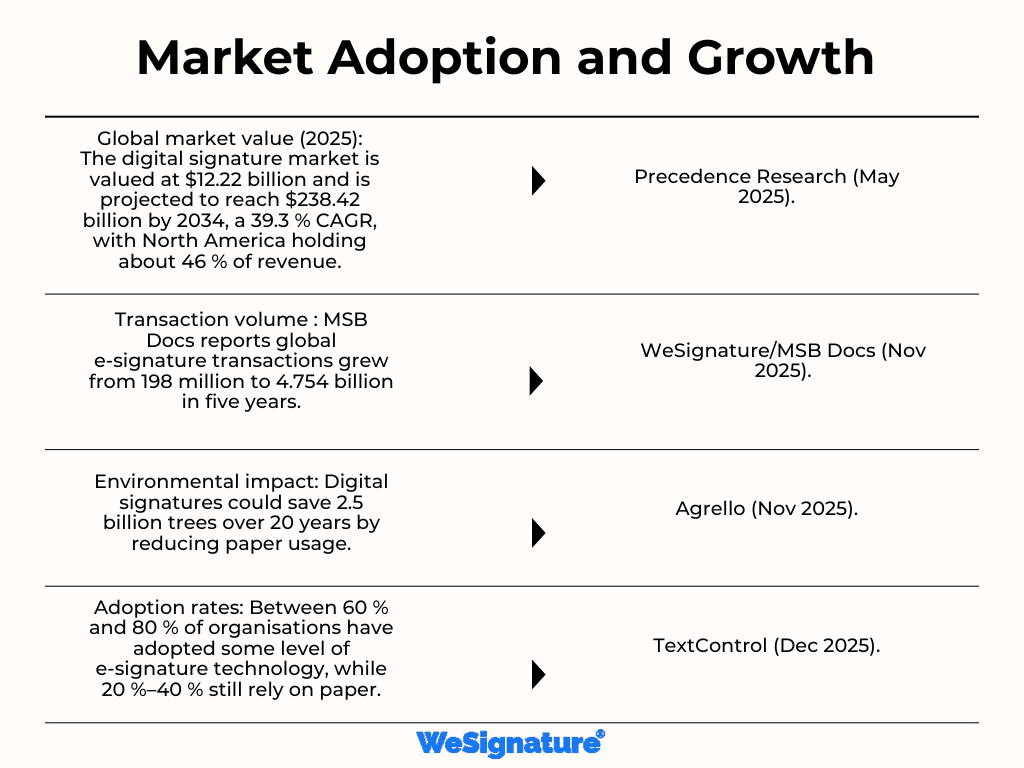
Recent research shows that organisations that adopt e-signature technology save $4–10 per document and reduce contract turnaround times by two weeks. With secure online document signing, you can enjoy these benefits without paying for expensive software.
This guide shows how to sign any document online for free using Wesignature, outlines the legal landscape and security basics, and provides practical tips to get started.
Are electronic signatures legal?
Before you start signing, it’s important to understand the difference between electronic and digital signatures and how the law treats them. In the United States, the Electronic Signatures in Global and National Commerce Act (ESIGN) and the Uniform Electronic Transactions Act (UETA) recognise electronic signatures as legally binding if certain conditions are met.
Electronic signatures are as enforceable as handwritten ones as long as there is a clear intent to sign and proper consent. That means clicking an “I agree” box or typing your name can carry the same weight as a “wet” signature, except for a few document types such as wills or court orders.
Electronic vs digital signatures
An electronic signature is any electronic process that indicates agreement, such as typing your name, clicking a button, or drawing a signature with your mouse. A digital signature is a specialised form of digital signature that uses encryption and certificates to verify the signer’s identity and make documents tamper-evident.
Digital signatures add a unique, tamper-evident fingerprint and use encryption to prove the signer’s identity. The table below summarises the key differences:
| Definition | Any electronic action that signals intent to sign (e.g., typing a name or clicking “I accept”). | A specific type of electronic signature that uses encryption and digital certificates to authenticate the signer and secure the document. |
| Security | Depends on platform; may involve simple audit trails and basic encryption. | Uses cryptographic hashing and certificates to produce a tamper-evident seal and confirm identity. |
| Legal status | Legally binding under ESIGN and UETA when intent and consent are clear. | Also legally binding and often required for regulated workflows or cross-border agreements. |
Why use a free e-signature tool?
For many agreements, employment contracts, NDAs, and purchase orders, a free e-signature tool is all you need. Moving away from paper delivers tangible benefits:
- Cost savings and speed. DocuSign reports that businesses using e-signatures save $4–10 per document and cut turnaround times by two weeks. Automating signatures eliminates printing, scanning, and postage expenses.
- Convenience and accessibility. Online signing works from any device with an internet connection. Many free tools, including Wesignature, run in your web browser; no downloads are required.
- Security and compliance. Reputable providers encrypt documents during transit and storage. Smallpdf explains that its e-sign tool uses TLS encryption and ISO/IEC 27001-certified security controls to protect your data. Wesignature offers similar protections, so your contracts remain confidential.
- Legality and audit trails. E-signature platforms automatically capture timestamps, IP addresses, and version hashes, ensuring each signature is defensible if challenged.
Step-by-step: sign documents online for free with Wesignature
The following guide uses Wesignature as an example, but the basic process is similar across most free e-signature tools. No credit card is required to try the basic features.
1. Create or access your Wesignature account
If you’re a first-time user, head to Wesignature’s website and sign up for a free account using your email address. Choose a strong password and enable two-factor authentication if available. Registered users can simply log in. Some platforms let you use the tool without creating an account, but an account gives you access to stored signatures and audit logs.
2. Upload your document
Once you’re logged in, select “Upload Document” or “New Agreement.” Most tools accept PDF, Word, Excel and image formats. For example, DigiSigner’s free tool instructs you to drag and drop your file or select it from your computer, while Smallpdf tells users to import or drop their document into the signing tool. When the upload completes, the document appears in your browser, ready to be prepared.
3. Add recipients (optional)
If you need signatures from others, add their names and email addresses. In Wesignature, you can specify whether each recipient is a signer, an approver, or a CC. Assigning roles helps streamline multi-party agreements. Some free plans limit the number of signers or documents per month; check the plan details to avoid surprises.
4. Prepare the document
Place signature fields and other input fields where each signer needs to act. Free e-signature tools let you insert text boxes, date fields, checkboxes, and initial fields. DigiSigner explains that its editor allows users to add text, select checkboxes, insert dates and initials, and fill in forms. Use these features to ensure signers know exactly where to sign or provide information.
5. Create your e-signature
There are three common ways to create a free electronic signature:
- Draw: Use your mouse, stylus or finger to draw your handwritten signature. DigiSigner’s guide notes that users can draw an e-signature using a mouse or touchpad.
- Type: Enter your name and select from various handwritten-style fonts to quickly produce a professional signature.
- Upload: Scan or photograph your handwritten signature. The platform will place the image on your document. Smallpdf also supports drawing, typing or uploading your signature.
Choose the method you prefer. Many users combine options, for example, signing formal contracts by hand and typing for informal approvals.
6. Sign the document
Click the signature field you created and select your saved signature. You can also add initials or a date if needed. When all required fields are completed, click “Finish & Sign” or “Done.” Smallpdf’s instructions summarise this step: after adding your signature and other elements, click ‘Finish & Sign’.
At this point, Wesignature will lock the document and generate a tamper-evident seal using digital signature technology, ensuring no changes can be made without invalidating the signature.
7. Invite others to sign (if applicable)
If you added recipients, Wesignature will send them a secure link via email. They follow similar steps: open the document, verify their identity, and sign. You can track each signer’s status in your dashboard. Reminders can be automated for overdue signatures, which helps keep deals moving.
8. Download or share the signed document
Once everyone has signed, download the final, signed document or share it directly from Wesignature. Both DigiSigner and Smallpdf emphasise downloading or sharing the final document after completion.
Wesignature provides a certificate of completion that includes timestamps, IP addresses, and a unique document hash. Save this certificate with your signed document for legal proof.
9. Store and manage your agreements
Good record-keeping is essential. Free accounts may include limited cloud storage; however, you should download and store your signed documents in a secure location, such as an encrypted drive or a document management system.
Keep copies accessible to all parties and retain them for the period required by your industry or jurisdiction. If you upgrade to a paid Wesignature plan, you gain access to advanced features such as bulk sending, templates, and longer storage retention.
Security tips and best practices
Signing documents online is safe when you follow best practices:
- Choose trusted providers. Look for vendors with certifications like ISO/IEC 27001 and GDPR compliance. Smallpdf notes that its e-sign tool is ISO/IEC 27001 certified and uses TLS encryption; Wesignature offers comparable standards.
- Use multi-factor authentication (MFA). MFA protects your account from unauthorised access. Activate it for both your Wesignature account and your email.
- Verify signer identities. For high-value or regulated documents, require recipients to verify their identity with a one-time passcode or government-issued ID.
- Keep audit trails. Maintain certificates of completion and ensure that each document’s hash and timestamps are preserved. These logs provide evidence of intent and consent if the signature is challenged.
- Update your software. Always run the latest version of your browser and operating system; this reduces vulnerabilities and ensures compatibility with e-signature platforms.
Why choose Wesignature?
While many free tools allow you to sign documents online, Wesignature is designed to make online document signing simple without compromising security. Key advantages include:
- User-friendly interface. Wesignature’s dashboard guides you through uploading, preparing, and sending documents without technical knowledge.
- Multiple signature options. Draw, type, or upload your signature exactly as you would with other leading tools.
- Compliance and security. Wesignature uses TLS encryption during transmission and stores documents in encrypted form. It’s a free e-signature tool that aligns with ESIGN and UETA requirements, so your agreements are legally binding in the U.S. and recognised internationally.
- Scalability. Start with the free plan to sign a few documents each month. As your business grows, upgrade to features like advanced authentication, team collaboration and automated workflows.
Concluding Remarks
Signing documents online no longer requires expensive software or complicated workflows. Thanks to legal frameworks like ESIGN and UETA, e-signatures are widely accepted, and free tools provide powerful features to meet everyday needs.
By choosing a secure platform like Wesignature and following the step-by-step process outlined above uploading your file, preparing fields, creating your signature, signing and downloading you can complete agreements in minutes without printing a single page.
Take advantage of cost savings, improved efficiency, and strong security today by trying Wesignature’s free e-signature solution, and enjoy a simpler way to manage your contracts.